


How Do Robot Window Cleaners Work? Setup, Care, and Troubleshooting

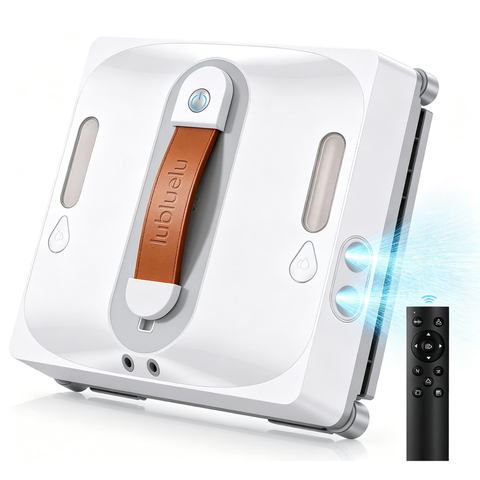
A robot window cleaner uses fan-powered suction to stay against the glass, rubber drive tracks to move across it, and a microfiber pad to wipe away dirt. The lubluelu CHYW201 window cleaning robot sprays a fine mist to help loosen dirt as it follows an N- or Z-shaped cleaning path.
If you remember one thing before your first run, make it this: Damp, flat, and never dripping. Dampen the pad evenly, wring it out by hand until it stops dripping, then press it flat onto the robot. Excess water can make the robot slip. A clean, evenly damp pad can also help reduce streaks on the first pass.
How Does a Robot Window Cleaner Grip, Move, and Clean?
- It grips the glass. A fan creates suction to hold the robot against the pane. Secure the safety rope to a fixed object before every run for backup fall protection.
- It moves in passes. Rubber drive tracks move the robot across the pane, while sensors help detect edges. The CHYW201 follows an N- or Z-shaped route. If the glass near the frame needs another pass, select Edge Cleaning on the remote.
- It sprays and wipes. A fine mist helps loosen everyday dirt, and the microfiber pad picks it up as the robot moves. For the areas around the pane, follow a separate window frame, sill, and track cleaning routine.

Where Can You Use a Robot Window Cleaner?
The lubluelu CHYW201 is designed for smooth, flat, seamless vertical surfaces. Check that the cleaning area is at least 50 cm wide and 50 cm tall (about 20 × 20 inches).
- Windows and floor-to-ceiling glass. Suitable for single-, double-, and triple-pane windows, including framed and frameless glass.
- Mirrors, glass doors, and marble walls. Choose smooth, flat vertical surfaces without seams in the cleaning area.
- Sloped glass. The robot can be used on sloped glass, but it may drift from a straight path. Check for missed areas after the cycle.

Can a Robot Window Cleaner Clean Horizontal Glass?
Horizontal glass is currently not recommended for the CHYW201 or CHYW200. This includes glass tabletops and horizontal skylights. On a horizontal surface, the gyroscope-based angle detection system may have trouble guiding the robot along its usual cleaning path, which can leave large areas untouched.
How to Set Up and Use the lubluelu CHYW201
- Prepare the pad and tank. Dampen the pad evenly, wring it out until no drops fall, and fit it flat. Use the fill bottle to add clean water or an approved glass cleaner, then close the tank cap.
- Secure the rope and connect the power. Fasten the safety rope to a fixed object. Secure the twist-lock connector between the robot and the adapter cable, seat the power cord in the adapter, and plug it into an outlet.
- Start about 4 inches (10 cm) from the edge. Hold the robot by its handle, place it flat against the pane, and switch it on. Confirm it has attached securely before letting go.
- Retrieve the robot by the handle. When the cycle ends, the robot returns to its starting area. If it stops out of reach, use the remote to guide it to a spot you can safely reach. Grip the handle, press and hold the power button, and lift the robot off once the fan stops. Unplug it before releasing the safety rope.

How to Clean the Pad, Sensors, and Drive Tracks
Wash the Mop Cloth
Remove the pad, soak it in clean water for about two minutes, then gently hand-wash it. Wring it out thoroughly and let it air-dry before storing. If you’re cleaning several panes, check the pad between windows and rinse it when you see visible dirt. If it no longer fastens securely, use replacement Mop Cloth for the CHYW201 and CHYW200.
Wipe the Underside Sensors
After cleaning a dusty window, check the round sensors on the underside. Gently wipe away any buildup with a soft cloth.

Clean the Rubber Drive Tracks
With the robot off the glass, connect it to its power adapter and turn it on. On the CHYW201 remote, press and hold the top-left button to activate Track Cleaning. Wipe the rubber tracks with a damp cloth as they rotate.
Window Cleaning Robot Troubleshooting and FAQs
Why Does My Window Cleaning Robot Slip or Stop Right After Starting?
If you see water running down the glass, safely retrieve the robot and start with the pad.
- Check the fit. Reattach the pad so it lies flat, with no folds or lifted corners.
- Check for dirt and excess water. Wash the pad if it’s dirty, wring it out by hand until no water drips, and wipe any visible drips off the pane.
- Test left and right movement. If the issue continues, secure the safety rope, attach the robot to a pane you can safely reach, and use the remote’s left and right arrows to check whether it moves smoothly in both directions.
If the robot keeps slipping, stop the test and contact lubluelu support: contact@lubluelu.com
Why Is One Drive Track Still Not Turning After Cleaning?
If one track stays still during Track Cleaning, stop using the robot on glass. A drive component or an internal connection may have failed. Keep the housing closed and contact lubluelu support for return and replacement instructions.
Why Won’t My Robot Turn On When the Adapter Light Is On?
Check that the power cord is fully seated in the adapter and that the twist-lock connector to the robot is secure. If both connections are secure and the robot still gives no response, the control board or internal battery may need service. Contact lubluelu support for replacement instructions. If the voice prompts broke up or the robot stopped moving before it lost power, include those details.
Why Are There Streaks or Water Marks After Cleaning?
A dry pad may leave marks on the first pass before the spray moistens it evenly. A dripping or dirty pad can leave water or residue behind. Start with a clean, evenly damp pad, wring it out until no drops fall, and rinse it when you see visible dirt.
If your windows have a special coating, check the window manufacturer’s care instructions. The National Glass Association’s guidance on cleaning coated glass covers general care for these surfaces.
What Should I Do If a Part Is Missing From the Box?
Check the packaging inserts and compare the contents with the packing list in the CHYW201 User Manual. If a part is missing, send lubluelu support your model, order number, and the name of the missing part. Wait until you have all the parts needed for safe setup before using the robot.
How Do I Change the Voice Language on the CHYW201?
Briefly press the top-left button on the remote to cycle through English, German, French, Spanish, Italian, and Polish. Press and hold the same button to activate Track Cleaning. The CHYW200 has English voice prompts.
Can I Pour lubluelu Glass Cleaner Directly Into the Tank?
Yes. The official lubluelu glass cleaner for the CHYW201 and CHYW200 is ready to use. Pour it directly into the tank without diluting it, or use clean water for routine cleaning. Keep foaming or corrosive liquids out of the tank.
Leave a comment